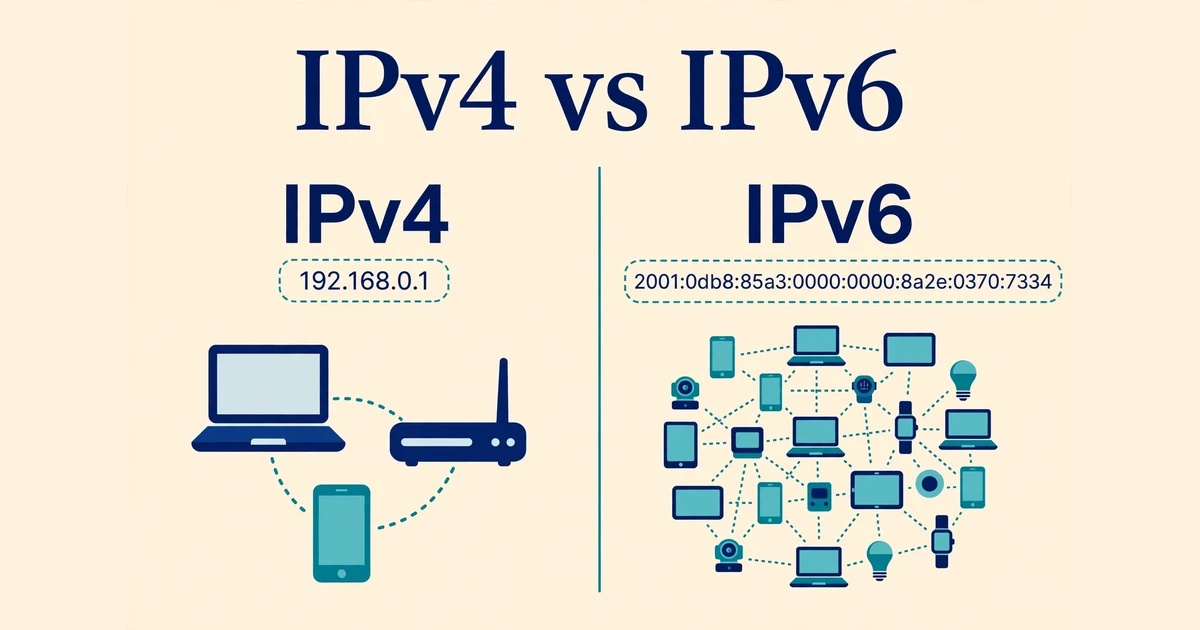
The difference between IPv4 and IPv6 is the size of the address book. IPv4 gives every device a short 32-bit address, which allows about 4.3 billion addresses. IPv6 gives every device a much longer 128-bit address, which allows about 340 undecillion addresses — enough for every device on Earth, many times over. IPv4 is the older system the internet grew up on; IPv6 is its bigger replacement, built because the world ran out of IPv4 room.
| Attribute | IPv4 | IPv6 |
|---|---|---|
| Address size | 32 bits | 128 bits |
| Number of addresses | About 4.3 billion | About 340 undecillion |
| How it looks | Four decimal numbers with dots, like 192.168.0.1 | Eight hex groups with colons, like 2001:db8::1 |
| Header size | 20 bytes minimum, size can vary | Fixed 40 bytes |
| Sharing addresses | Needs NAT, so many devices share one public address | No NAT needed; every device can have its own public address |
| Setting up a device | Usually needs DHCP or manual setup | Can set itself up automatically on a network |
| Security design | Security added later, on top | IPsec security built into the design |
| Use today | Still the most common version | Growing fast, and all new growth depends on it |
Introduction
Every device on the internet needs an address, just like every house needs a street address. The rules for writing those addresses are called the Internet Protocol, or IP for short.
IPv4 is version 4 of that protocol, defined in 1981, when the internet was a small research network and nobody imagined billions of phones and gadgets would one day need addresses. IPv6 is version 6, designed to fix the shortage that IPv4 created.
This guide compares them on address size, style, headers, sharing, setup, and security.
What Is IPv4?
IPv4 is the fourth version of the Internet Protocol and the version most of the internet still runs on. Its rules were published in 1981 as RFC 791 (RFC 791, “Internet Protocol”).
An IPv4 address has 32 bits, written as four decimal numbers separated by dots. Each number runs from 0 to 255. A familiar example is 192.168.0.1, the address many home routers use. With 32 bits, the total is 2 to the power of 32 — about 4.3 billion addresses.
That sounded huge in 1981. It is not huge now: phones, tablets, watches, cameras, and cars all want addresses. The result was address sharing, explained below.
Main Characteristics of IPv4
- 32-bit addresses, written as four decimal numbers with dots
- About 4.3 billion possible addresses in total
- Header of at least 20 bytes, with a checksum routers must check
- Devices usually get addresses from DHCP or by hand
- Private addresses (like 192.168.x.x) for home networks, shared through NAT
What Is IPv6?
IPv6 is the sixth version of the Internet Protocol and the planned long-term replacement for IPv4. Its current rules were published in 2017 as RFC 8200 (RFC 8200, “Internet Protocol, Version 6 (IPv6) Specification”).
An IPv6 address has 128 bits, written as eight groups of hexadecimal digits (0–9 plus a–f) separated by colons. With 128 bits, the total is 2 to the power of 128 — about 340 undecillion addresses, that is 340 followed by 36 zeroes.
In short, IPv6 adds so much room that running out is no longer a practical worry: every phone, watch, light bulb, and sensor could have its own public address.
Main Characteristics of IPv6
- 128-bit addresses, written as eight hex groups with colons
- About 340 undecillion possible addresses in total
- Fixed 40-byte header, with no checksum for routers to recalculate
- Devices can configure themselves automatically on a network
- No NAT needed; every device can hold its own public address
How the Addresses Look
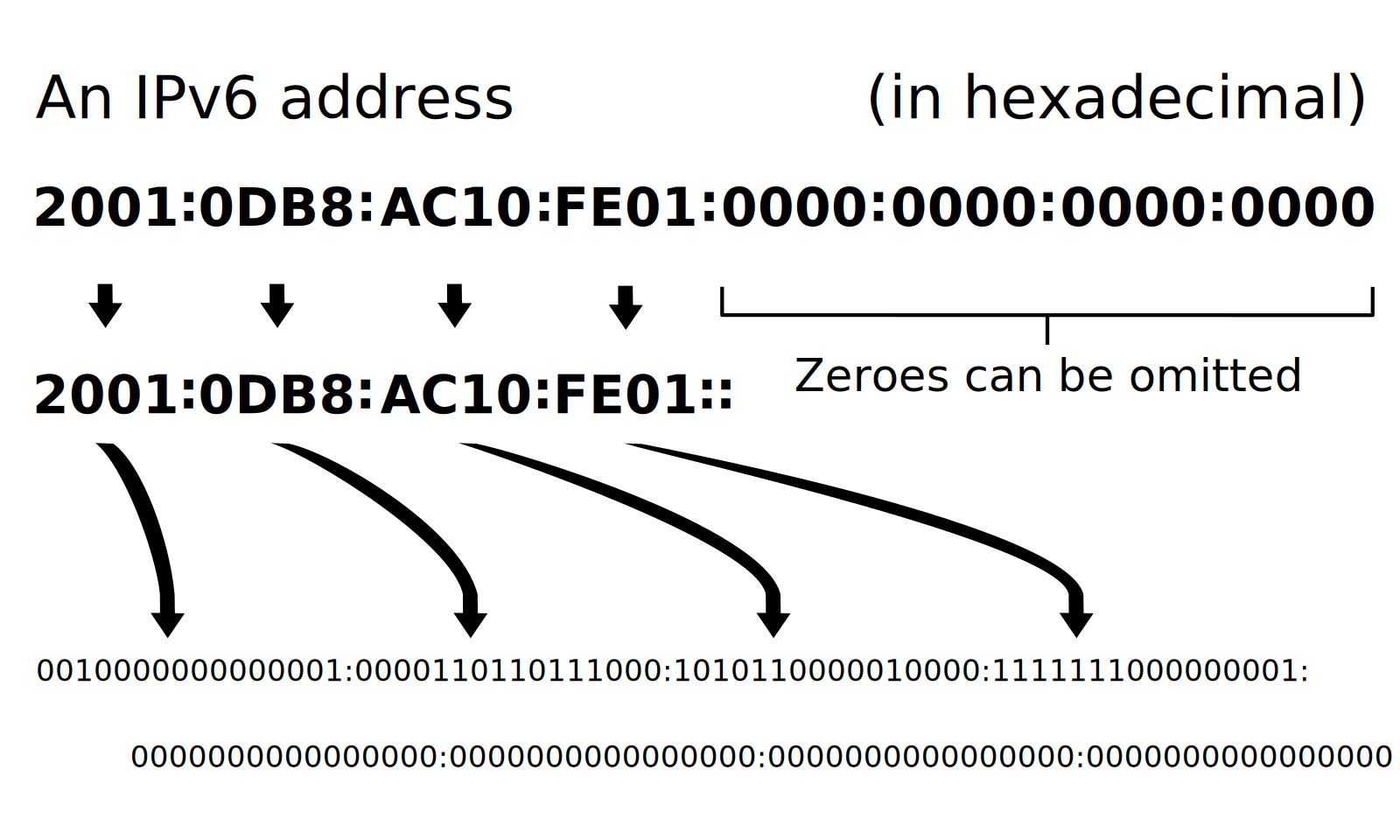
An IPv4 address is easy to read: 192.168.0.1 — four short numbers, three dots, done. An IPv6 address looks harder at first: 2001:0db8:85a3:0000:0000:8a2e:0370:7334. But two shortening rules help: leading zeroes inside a group can be dropped, and one run of all-zero groups can be replaced by a double colon, giving 2001:db8:85a3::8a2e:370:7334.
The diagram below shows the same trick on a documentation address: the full form, then the short form with the zeroes left out.
One habit to keep: the double colon may appear only once in an address, or it becomes unclear.
Core Difference Between IPv4 and IPv6
Six clear points separate IPv4 from IPv6.
Difference 1: The Size of the Address Space
This is the difference that matters most. IPv4 offers about 4.3 billion addresses. IPv6 offers about 340 undecillion. Think of bits like digits in a combination lock: adding one bit doubles the combinations, and IPv6 has 96 more bits than IPv4. The same idea shows up in computing generally, as our guide on the difference between x86 and x64 explains for 32-bit and 64-bit systems.
The shortage is real, not theoretical. On 3 February 2011, IANA, the body that hands out address blocks to the world’s regions, allocated its last remaining IPv4 blocks to the five regional registries, emptying the global free pool. You can see the current state of those allocations in IANA’s IPv4 address space registry.
Difference 2: The Header
Every message travels in a packet, and every packet starts with a header — a label with the sender, the receiver, and handling notes. IPv4 headers are at least 20 bytes, can grow with optional extras, and carry a checksum every router must check and recalculate. IPv6 headers are a fixed 40 bytes with no checksum. That sounds bigger, but it is simpler: the size never changes and nothing needs recalculating.
Difference 3: NAT, or Address Sharing
NAT (Network Address Translation) is IPv4’s workaround for the shortage. Your home router holds one public IPv4 address and gives every device in the house a private address, like 192.168.0.5. When a device sends a message out, the router swaps the private address for the public one, and swaps it back when the reply arrives. It works, but it can complicate video calls, games, and servers run from home.
IPv6 needs no such workaround: with addresses to spare, each device can have its own public address and talk directly.
Difference 4: Setting Up a Device
On IPv4, a device usually gets its address from a DHCP server — a helper that hands out addresses — or an administrator types it in by hand. On IPv6, a device can also configure itself: it learns the network prefix from the router and builds its own address (stateless autoconfiguration).
Difference 5: Security
IPv4 was designed before security was a daily worry, so protections like encryption were added later, on top. IPv6 was designed with IPsec — rules for encrypting and checking messages — built into the protocol from the start. Encryption still has to be switched on, but the support is part of the design, not an afterthought.
Difference 6: Living Together
IPv4 and IPv6 cannot talk to each other directly. An IPv4-only device and an IPv6-only device need a translator in between, or a network that runs both versions at once — called dual-stack. Most networks today run dual-stack: your device gets both addresses and uses whichever one reaches the site you are visiting. That is why the changeover has taken years instead of happening overnight.
Which One Should You Use?
For most people, the honest answer is: both, and you do not need to choose. Your provider and your devices already decide for you: devices use IPv6 where it works and fall back to IPv4 where it does not. Turning IPv6 on at home is usually a single router setting, and it is worth doing if your provider supports it.
For everyday use — browsing, streaming, video calls — the version rarely decides how fast things feel. Speed depends far more on your connection and the service itself, as our guide on the difference between SD and HD shows for video quality. On mobile, your carrier handles the version behind the scenes, whatever plan you hold — see the difference between postpaid and prepaid for how those plan types work.
If you run a website or server, support IPv6: some visitors and mobile networks now reach you over IPv6 first, and a site without it can be slower or unreachable for them.
Conclusion
IPv4 and IPv6 do the same job — giving devices addresses so messages find their way — but IPv6 does it with vastly more room and a simpler design. IPv4’s 4.3 billion addresses ran out at the global level in 2011, and sharing tricks like NAT have kept it going since. IPv6’s 340 undecillion addresses end the shortage, drop the need for sharing, simplify headers, and build security in. You do not need to pick a side: most networks run both, and IPv6 quietly takes over more traffic every year.
Frequently Asked Questions
Can I use IPv6 at home today?
Yes, in most cases. If your internet provider supports IPv6, your router can hand out IPv6 addresses alongside IPv4 ones, and your devices will use IPv6 automatically where it works. Check your router’s settings for an IPv6 option, or ask your provider whether it is enabled on your connection. If it is not offered yet, everything still works fine on IPv4.
Is IPv6 faster than IPv4?
Not by itself. The version of the address does not set your speed; your connection, your provider, and the website or service you use matter far more. Some people notice slightly quicker connections on IPv6 because it skips NAT sharing, but the difference is usually small. If your internet feels slow, the cause is almost always the connection itself, not the IP version.
Will IPv4 stop working one day?
Not soon. IPv4 still carries a large share of internet traffic, and huge amounts of equipment and software depend on it. The changeover works through dual-stack networks that run both versions together, so IPv4 devices keep working while IPv6 grows. Expect a long, gradual handover measured in years, not a sudden switch-off date.
Why do IPv6 addresses look so long?
Because they carry 128 bits instead of 32, written as eight groups of hexadecimal digits. Hexadecimal packs more value into each character than decimal, which keeps the address shorter than it would otherwise be. Shortening rules help further: leading zeroes can be dropped, and one run of zero groups becomes a double colon, so most addresses you meet are far shorter than the full form.
Do I need a new router for IPv6?
Usually not. Most routers sold in the last decade already support IPv6; it may simply be switched off in the settings. Log in to your router, look for an IPv6 setting, and turn it on if your provider supports it. Very old routers may lack the option, in which case a replacement is the only fix.

Hi! I am Arshad Ullah presently working as linguist in Punjab Education Department. I have done MA in English Literature while M.Phil in Applied Linguistics. I have taught creative writing to the post graduation classes for 15 years. Presently I am working as content writer, and offering classes for blog writing. On this site, I research each topic from authoritative sources and edit every comparison for accuracy and clear, simple language.